Coverage that makes sense
Access points placed by layout and wall material, not guesswork, so you have signal in the bedroom, the backyard and the basement.
Whole-home WiFi & Networking
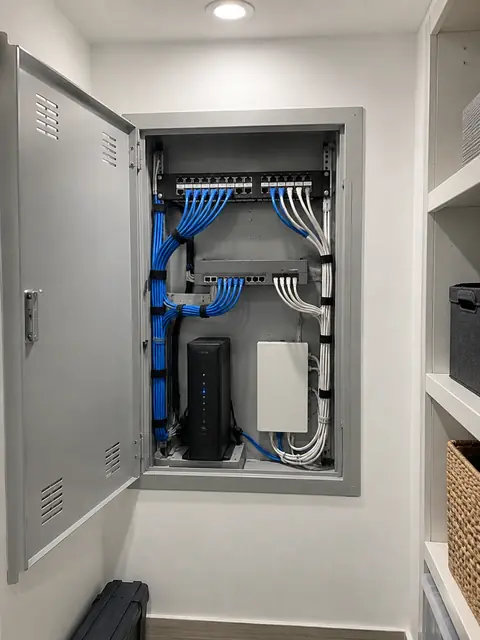
A router in a closet and a few extenders is not a plan. We design whole-home networks with wired access points, proper switches and a clean setup, so streaming, video calls and your smart devices stop competing with each other.
What you get
Access points placed by layout and wall material, not guesswork, so you have signal in the bedroom, the backyard and the basement.
Each access point gets its own cable, so every room gets full speed instead of a shared wireless hop.
Guests, kids, smart devices and work computers can live on separate networks so one problem does not touch the others.
Labeled gear, saved settings and a simple admin app so anyone can understand the system later.
If you upgrade to a faster plan or fiber, the network inside is ready to use it.
We find the real cause of dropouts, from interference to a bad cable, instead of just replacing the router.
What most people don’t know
Plain answers from the install side, so you can decide with the full picture.
Most “mesh” kits connect their nodes to each other over WiFi. Each wireless hop shares the same airtime, so speed drops with every node. If each access point is connected back to the switch by Ethernet instead (wired backhaul), every node works at full capacity. When you can run a cable, run a cable.
Three strong access points set to full power in one house can interfere with each other. Good designs use fewer, well placed access points with sensible channel and power settings. A site survey and some planning beat buying more boxes.
Power over Ethernet sends power and data down the same cable, so access points, cameras and intercoms can be mounted on a ceiling without a nearby outlet. It also means a single battery backup (UPS) at the rack keeps everything running during a short outage.
A fast plan can still feel slow if the router is overloaded, the cable is old, or WiFi is weak. We check the whole path: line from the street, modem or fiber terminal, router, switch, cable and WiFi.
How it works
We look at the space, talk through how you use it and what you want to fix.
A written plan and clear price. Changes are agreed before work happens.
Neat, labeled work, with respect for your home or business.
We test everything, walk you through it and stay available after.
FAQ
Not always, but wiring is what makes the biggest difference. If walls can be opened, we run Ethernet to ceiling access points. If not, there are options like running cable through closets, basements and attics, or carefully chosen wireless solutions.
For a small apartment, often yes. For larger homes, multi-story buildings or many devices, wired access points are noticeably more reliable.
Yes. Often we put the provider’s box in a simple mode and use our own gear behind it, or use the provider’s equipment only as the connection to the street.
A properly designed network can handle dozens to hundreds of devices. We size the system for what you actually have today and what you may add.
Yes, when it makes sense: home offices, media storage, or a fiber connection that is faster than 1 Gbps. We will tell you honestly when 1 Gbps is plenty.
A short description is enough. We will reply with next steps and a written quote.